
How to Fix Broken Operational Workflows: A Practical Playbook

The fastest way to make a broken workflow worse is to automate it. If work stalls between teams, approvals pile up, and staff rely on follow-ups or spreadsheets to keep tasks moving, the problem isn’t a lack of effort. It’s a process that needs fixing. Knowing how to fix broken operational workflows starts with finding where work actually gets stuck, not guessing at the cause.
You need a practical way to uncover the friction, make a focused change, and confirm that it works without disrupting the business. This playbook shows you how to trace delays through handoffs and approvals, simplify the process before adding automation, and compare results against a clear baseline. You’ll also learn how to assign ownership so the workflow doesn’t slip back into workarounds. When an issue crosses teams or accountability is unclear, embedded Fractional COO leadership can connect diagnosis with execution. Fix the process first, then scale what the evidence shows is working.
Table of Contents
How to Fix Broken Operational Workflows by Finding the Real Failure
Map the Workflow and Diagnose What Is Causing the Bottleneck
Choose the Right Workflow Fix: Clarify, Simplify, Standardize, or Automate
How to Pilot a Workflow Redesign and Measure Whether It Works
Keep Operational Workflows Healthy with Clear Ownership and Leadership
How to Fix Broken Operational Workflows by Finding the Real Failure
Missed handoffs. Duplicate work. Approvals that sit untouched. The same exceptions surfacing again and again. These are signals that work isn’t moving reliably from request to outcome. Don’t jump straight to blaming the people doing the work. A workaround may be the clearest evidence that the process itself is failing.
A workflow is broken when work repeatedly misses its intended outcome, timing, or quality. That definition turns vague frustration into something you can investigate. To learn how to fix broken operational workflows, look for patterns in what happens to work, not assumptions about who caused the delay. The discipline of Business process management offers a foundation for analyzing and improving processes systematically.
Task management choices can shape how work is organized. This video explores how different people approach task management:
Which workflow symptoms signal a process problem?
Follow the work through its actual path. Where does it wait? Where does it change hands? Where does it return for correction? Repeated queues may point to a capacity issue or approval bottleneck. Rework can signal missing information, unclear standards, or decisions made too late. Manual tracking and repeated follow-ups often reveal that ownership or status isn’t visible.
Separate a one-off mistake from a recurring pattern. Review several recent cases and note where delays, duplicate entry, unclear decisions, or exceptions appear. Record the step where each issue occurs and what happened just before it. If the same snag keeps showing up, treat it as a process signal and investigate what makes it likely.
Why do operational workflows break as companies grow?
Growth adds volume, teams, tools, and decision points. A process that worked when one person could see the whole job may falter once responsibility crosses departments or approvals multiply. If no one owns a handoff, tasks can fall between roles while people chase updates or repeat work just to keep things moving.
The cause may be policy, capacity, information, or technology. A required approval might no longer fit the risk; a team may lack the capacity to clear its queue; an incomplete request may trigger rework; or disconnected tools may hide status. Diagnose the condition behind the symptom before changing the process. Fix the cause, not just the visible inconvenience.
Map the Workflow and Diagnose What Is Causing the Bottleneck
Once you’ve chosen a workflow that affects a meaningful business outcome, define its boundaries. Name the trigger that starts the work, the result that marks completion, and the consequence if the process stalls or fails. Keep the scope focused. For example, map customer order processing from submission to confirmation rather than trying to map an entire department.
A bottleneck is a constrained step that limits the flow of work from start to finish. It may be a review queue, a decision that only one person can make, or repeated corrections caused by incomplete requests. The step that looks longest isn’t automatically the bottleneck. Check where work accumulates and how that constraint affects the full process.
How do you map a workflow as it actually happens?
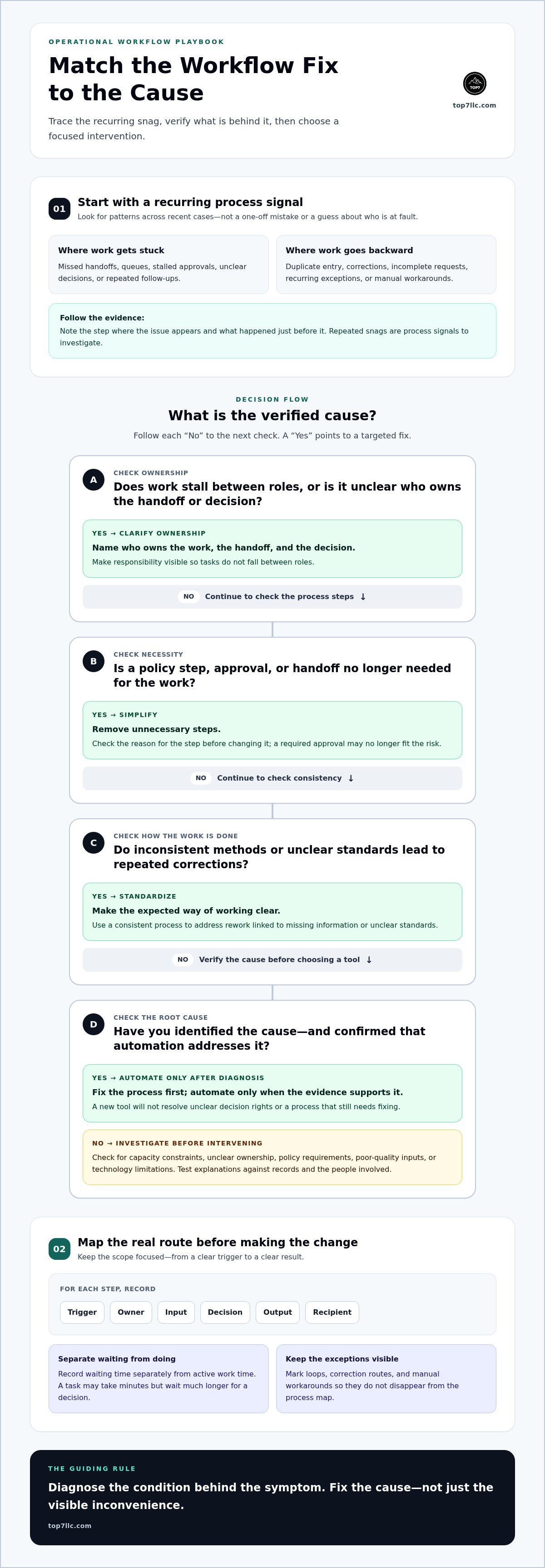
Document the real route, not just the polished version in a procedure manual. For each step, record the trigger, owner, input, decision, output, and recipient. Use interviews to learn what people do, observe the work in practice, and compare both with available operating data. A simple swimlane diagram, with a separate lane for each role or team, makes handoffs and ownership gaps visible.
Track waiting time separately from active work time. Note where requests sit untouched, return for missing details, or move through manual workarounds. That distinction matters: a task might take minutes to complete but wait much longer for a decision. Mark loops and exception routes on the map so they don’t disappear inside an average or an idealized process.
How can you identify the root cause, not just the symptom?
Compare the documented process with recent examples and observed practice. If a request repeatedly returns to its origin, test possible explanations: Is required information missing? Are decision rights unclear? Is the reviewer overloaded, or does policy require an unnecessary step? Treat each explanation as a hypothesis. Check records and ask the people involved before deciding what to change.
Look across the whole system before assigning blame. Capacity constraints, unclear ownership, policy requirements, poor-quality inputs, and technology limitations can produce similar symptoms. For example, a stalled approval may look like an individual delay, but evidence could show that requests arrive without the details needed to decide. The right fix depends on which explanation the facts support.
This evidence-led approach is central to process improvement: find the source of friction before selecting an intervention. When an investigation spans teams or exposes unclear operational ownership, Fractional COO support can connect diagnosis with coordinated execution.
Choose the Right Workflow Fix: Clarify, Simplify, Standardize, or Automate
Match the fix to the cause you verified. A new tool won’t resolve unclear decision rights. A checklist won’t clear a capacity constraint. The right change may be smaller and easier to test than a technology purchase. Use this decision guide to choose an intervention that addresses the actual failure.
When should you clarify ownership or simplify steps?
Clarify accountability when tasks wait between roles or a decision has no clear owner. Specify who moves the work forward, who can approve it, and what happens if an exception arises. If work stalls because nobody knows who should act next, make the handoff explicit: name the next owner and the information they need to proceed. If a process requires duplicate data entry or approvals that provide no real control, remove those steps. Keep checks that protect quality, manage risk, or meet a genuine compliance need.
When should you standardize or automate a workflow?
Standardize work when inconsistent execution produces avoidable defects or unpredictable handoffs. Define the expected steps and inputs, while making room for a clear exception path. Consider automation only after the process rules, ownership, inputs, and exceptions are understood. Otherwise, automation can accelerate a flawed process, moving bad information faster and making errors harder to spot.
Each option has a trade-off. Clarifying ownership takes coordination but can preserve flexibility. Simplifying removes effort, but requires judgment about which controls matter. Standardization improves consistency, though overly rigid rules can frustrate teams facing unusual cases. Automation can reduce routine manual handling, but depends on accurate inputs and stable rules, and still needs oversight for exceptions.
That’s the practical answer to how to fix broken operational workflows: change the smallest part that addresses the proven cause, then check whether work flows better. Don’t buy technology to avoid making a process decision. Repair the process first, then automate only what’s ready to run reliably.
How to Pilot a Workflow Redesign and Measure Whether It Works
A process change isn’t proven because it feels smoother in a meeting. Set a baseline first, then test the redesigned workflow on a defined slice of work. That gives you evidence to decide whether the change improved the outcome, created new problems, or needs another adjustment.
What should you measure before and after a workflow change?
Choose a small set of measures that reflect the workflow’s purpose. For a process designed to move requests reliably, useful measures might include cycle time, error or rework rate, and the number of items waiting in a backlog. If the intended outcome is quality or a better experience, include a measure that captures that too. Speed alone can hide defects, rushed decisions, or extra work pushed downstream.
Define each measure before the pilot. Specify when the clock starts and stops, what counts as an error, and how backlog is counted. Then compare like-for-like work where possible. A change in request complexity or volume can distort results if you treat every case as equivalent. Use the baseline to set realistic goals for your organization, not an invented universal benchmark.
How do you run a low-disruption workflow pilot?
Write down the test plan before changing the process. State the hypothesis, the team or workflow slice in scope, the accountable owner, and how long the pilot needs to produce useful evidence. Set review conditions in advance, including what would support adopting, adjusting, or stopping the change. The right duration depends on how often the workflow runs and how much variation it contains.
Brief everyone affected on what changes, who owns each step, and where exceptions should go. Document the new process and create a simple route for employees to report friction as it appears. The owner should review the agreed measures alongside exception notes, not rely on anecdotal feedback alone. If work moves faster but rework rises, the pilot hasn’t delivered a clear win.
At the review, compare the results with the baseline and the hypothesis. Adopt the change if the evidence supports the intended outcome without unacceptable trade-offs. Adjust it if the pilot exposes a fixable gap. Stop if it worsens quality, creates risk, or fails to address the original constraint. This disciplined test turns how to fix broken operational workflows into a decision process, not a guess.
Top7’s operational change support connects workflow diagnosis, implementation, and accountability, including Fractional COO leadership and advanced project management. Details are available at Top7’s operational change support.
Keep Operational Workflows Healthy with Clear Ownership and Leadership
A workflow redesign won’t stay effective by itself. Work changes, teams shift, and new exceptions appear. Give the process a named owner with authority to maintain it, and make ongoing review part of the operating model. Otherwise, yesterday’s workaround can quietly become tomorrow’s standard.
What does a workflow owner need to keep the process working?
The owner is accountable for the workflow’s performance, not necessarily responsible for completing every step. They keep the process map and role expectations accessible, maintain decision rules, communicate updates, and make sure exceptions reach the right person. They also review measures and employee feedback when workload, policies, or systems change.
Set a review cadence that fits the workflow. A process exposed to frequent changes or higher operational risk may need closer attention than a stable, low-risk routine. Review after meaningful changes, recurring exceptions, or signs that performance is slipping. The goal isn’t to schedule meetings for their own sake. It’s to catch drift before it becomes the new normal.
When can embedded leadership help repair cross-functional workflows?
Cross-team problems need more than a process document. They need leaders who can align priorities, clarify decision rights, and make sure teams follow through on their part of the change. A Fractional COO can help coordinate ownership when a workflow crosses departments or falls between leaders’ responsibilities.
Advanced project management supports the execution side: sequencing changes, coordinating contributors, tracking decisions, and keeping actions visible. That structure matters when fixing one handoff affects other teams or requires coordinated changes across the business.
Top7’s Velocity-7 Adaptive Framework uses agile-based transformation to help organizations move from operational friction toward more efficient flow. Combined with embedded leadership, it connects workflow findings to coordinated change and accountability. That’s a practical way to fix broken operational workflows and keep improvements working as the business evolves.
Turn Workflow Friction into Reliable Growth
Knowing how to fix broken operational workflows starts with evidence, not assumptions. Trace where work stalls, identify the cause, then choose a targeted change: clarify ownership, simplify steps, standardize repeatable work, or automate only when the process is ready.
Test the redesign against a baseline before scaling it. Measure speed alongside quality, rework, and backlog, and assign a clear owner to keep the process current as the business changes. That’s how a one-time fix becomes a workflow your team can rely on.
When improvement crosses teams or needs stronger execution, Top7 provides Fractional COO and advanced project management support. Its Velocity-7 Adaptive Framework focuses on moving organizations from operational friction toward more efficient flow.
Start with one process, learn from the evidence, and build momentum from there. Work with Top7 to put a clear owner behind your next operational improvement.
Frequently Asked Questions
How do you fix a broken workflow?
Fix it by identifying where work fails, verifying the cause, and changing the process before adding tools. Choose one workflow with a clear start, finish, and business impact. Map what people actually do, including handoffs and exceptions, then select a targeted fix such as clarifying ownership, removing redundant steps, or standardizing repeatable work. Pilot the change, compare results with a baseline, and assign an owner to maintain it.
What are the signs of a broken operational workflow?
Common signs include repeated delays, missed handoffs, duplicate work, stalled approvals, recurring corrections, and manual workarounds. Look for patterns across multiple cases rather than treating one mistake as proof of a broken process. For example, if requests repeatedly return because required information is missing, the intake step or its instructions may be unclear. The key signal is work repeatedly missing its intended outcome, timing, or quality.
How do I find the bottleneck in a workflow?
Trace recent work from its trigger to its final outcome and record each step, owner, decision, and handoff. Note where tasks wait, build up, or return for rework. Separate waiting time from active work time, since a short task can sit in a queue far longer than it takes to complete. Check your map against employee observations and available operating data to locate the constraint limiting end-to-end flow.
Should I automate a broken workflow?
Not before you understand and improve the process. Automation can make a flawed workflow run faster without fixing unclear ownership, unnecessary approvals, or unreliable inputs. First confirm the steps, rules, decision rights, and exception paths. If the work is repeatable and the inputs are dependable, automation may reduce routine manual handling. Keep appropriate human review for decisions that require judgment, and monitor for errors after the change.
How do you measure whether a workflow improvement worked?
Compare results with a baseline recorded before the change. Select measures that reflect the workflow’s intended outcome, such as cycle time, error or rework rate, backlog, or quality. Define each measure consistently so the before-and-after comparison is meaningful. Don’t judge success by speed alone: a faster process that creates more defects or pushes work downstream may be a poor trade. Review results alongside employee feedback and exceptions.
How long does it take to fix a broken workflow?
There’s no single timeline. The work depends on the workflow’s scope, how often it runs, how many teams and decisions it involves, and whether the cause is clear. Clarifying an owner may take less effort than coordinating policy or system changes across teams. Set a pilot period long enough to observe representative cases, then review evidence before scaling. Avoid promising a deadline before you understand the process and its constraints.
Who should be responsible for fixing an operational workflow?
Name one workflow owner who is accountable for the outcome, process documentation, escalation, communication, and ongoing review. The people doing the work should help identify friction and test changes, while relevant leaders resolve decisions that cross team boundaries. If ownership is unclear across departments, a Fractional COO can help align responsibilities. Advanced project management can coordinate changes and follow-through so agreed actions don’t stall.



Comments